Here’s my contribution to WebOS, a great software platform by Palm and despite all its still rough edges, IMHO the best smartphone user interface currently available.
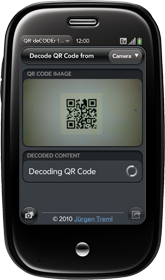
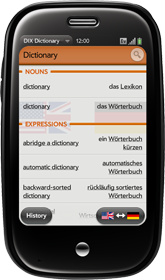
More webOS applications coming soon…

Here’s my contribution to WebOS, a great software platform by Palm and despite all its still rough edges, IMHO the best smartphone user interface currently available.
More webOS applications coming soon…
do you think you will you be able to have the pre do this natively when the pdk comes out?
from a technical perspective, yes, probably. I don’t know many details about the PDK but I’m pretty confident it’ll come with everything preQR needs to do the decoding locally.
From a more personal point of view: This is a tiny tool being developed in my spare time and which I offer free of any charges, so don’t expect too much. I had the PDK in mind when working on preQR and I’m planning to look into this possibility, but no promises. I’m willing to spend only so much time on it.
Hallo,
ich versuche vergeblich, die Upload-Funktion des Download-Managers zur Mitarbeit zu überreden. Du scheinst es ja hingekriegt zu haben – hast Du einen Tipp für mich oder gar ein Stück Code? Ich kriege zwar einen Aufruf der OnSuccess Funktion aber nur einen “Completion-Code”: “26″… bin auch ehrlich gesagt nicht so sicher, wie der Serverdienst aussehen muss, der die Datei in Empfang nimmt…
Vielen Dank im Voraus!
Konstantin Meyer
Das Ganze ist eigentlich gar nicht so schwierig. Der Upload selbst sieht bei mir im Code so aus:
this.controller.serviceRequest(‘palm://com.palm.downloadmanager/’, {
method: ‘upload’,
parameters: {
‘fileName’: filename,
‘url’: ‘http://www.irgendeineadresse.de/upload.php’,
fileLabel: ‘file’,
‘contentType’: ‘img’,
postParameters: [{key: 'uid', data: this.uniqueid + ''}, {key: 'src', data: this.src}, {key: 'app', data: global_app}, {key: 'version', data: global_version}, {key: 'device', data: Mojo.Environment.DeviceInfo.modelNameAscii}, {key: 'os', data: Mojo.Environment.DeviceInfo.platformVersion}, {key: 'lang', data: Mojo.Locale.getCurrentLocale()}],
subscribe: true
},
onSuccess: this.decodeSuccess.bind(this),
onFailure: this.decodeFailure.bind(this)
});
Die Funktion will den Dateinamen der Datei die hochgeladen werden soll, sowie ein Dateilabel, also den Namen der Post-Variablen unter der du dann in deinem Serverscript auf die Datei zugreifen kannst, in meinem Fall hab ich als Label einfach ´file´ gewählt, kann also in meinem PHP Script einfach mit $_FILES["file"] auf die hochgeladene Datei zugreifen dann. Die postParameters, die du in meinem Code noch findest, sind einfach weitere Daten die ich mit dem Upload mitschicke, die dann in PHP via $_POST["name"] verfügbar sind, z.B. die auf dem Gerät ausgewählte Sprache, OS Version, etc.
Nachdem die Datei hochgeladen wurde macht dein Script irgendwas damit und schickt anschliessend eine HTTP Antwort zurück, auf die du in der OnSuccess Funktion ungefähr so zugreifen kannst:
SnapAssistant.prototype.decodeSuccess = function(response){
if (!response.responseString)
return;
var result = response.responseString;
}
Soweit ich mich erinnern kann, wir die OnSuccess Funktion zweimal aufgerufen, einemal wenn der upload komplett ist, und einmal wenn die Antwort vom Server da ist, deshalb die einfach Abfrage am Anfange ob responseString null ist.
Hoffe das hilft erstmal. Im Laufe der nächsten Tage, wenn ich mal die Zeit finde, werde ich sowieso den kompletten Code von QR deCODEr zur Verfügung stellen. Ist ja ein Open Source Projekt. Zu finden wird das Ganze dann unter http://sourceforge.net/projects/qrdecoder/ sein.
Hi,
I am trying to do a similar thing, but I use the http://zxing.org/w/decode.jspx online decoder to process the image.
But I have a problem, the server doesn’t allow big images and I don’t know how to crops/resize the picture from camera.
Please let me know how do you handle this?
I have tried resizing with extractfs: var imagefile = “/var/luna/data/extractfs” + params.filename + “:0:0:640:640:3″; and this is working when displaying on the imageViewer, but not when uploading via download manager.(failed to start upload)
Thanks,
Ovidiu
Qr Decoder hat beim Pre 2 das Standard-Icon (Halbmond) und startet nicht.
I have 2.3 . But I need 2.2 how to I get it.
I don’t know how long this overall platform will be relevant, but for now I really dig that the QR code reader is available. Nice job!
Sorry, I do not have webOS so I do not know about the use of the application of webOS but when I saw the cell phone model, I am interested want to have it. How much is it cost??
Hi,
auf dem Pre3 mit webOs 2.2 läuft es nicht. Das Prog öffnet ein graues Fenster und danach tut sich gar nicht mehr. Auch lässt es sich nicht mehr deinstallieren.
Ist das Problem bekannt und gibt es eventuell schon eine Lösung?
hallo, ich hab auch das Pre3, und das selbe problem. Allerdings kann ich die app mittels softwaremanager löschen.
würde mich über ein fix freuen!
Danke für das Feedback. Sollte das Problem nicht allzu groß sein, werde ich versuchen es mit einem Fix in den nächsten Tagen zu beheben. Tatsache ist aber, dass bei all der Unsicherheit die HP bezüglich WebOS derzeit verbreitet, das Programm wohl nicht mehr allzu sehr weiterentwickelt und gewartet werden wird. Sorry for the bad news!
Sollte es nicht mehr weiterentwickelt werden, dann bitte Source freigeben. Danke.
damit war ja auch zu rechnen. Aber für den fix wäre ich dankbar.
danke im voraus.
mfg felix
hallo,
leider startet die App nicht. Nur eine graue Fläche auf dem Pre3.
bleibt das – vorsichtig gefragt …
andreas
ich würde mich ebenfalls um einen fix für pre 3 freuen – oder bei freigabe des quellcodes mir das eben anschauen…
bugfixing per cloud
same problem with pre2
application never starts
The QR Decoder app does not work on my Pre 2. Is an update available?
Ich habe Jürgen bereits per E-Mail (Adresse in der App) angeschrieben und den Fix angeboten, bekam aber keine Antwort.
Hallo Thomas,
sorry, die Mail ist wohl irgendwo untergegangen. Schick sie mir doch bitte nochmal und ich versuche den Fix einzubauen und die neue Version in de App Catalog zu stellen.
Danke für die Unterstützung!
As for all the issues with Pre 2 and 3: I’m aware of the issues. I’ll try to get out a fix a soon as possible, so you all at least have a working app again.
Still you should be aware of two things: I’m currently working on a new version of QR deCODEr which does all the decoding on the device itself instead of relying on a backend server infrastructure. This will speed up things a lot and allow for offline decoding without an internet connection. As a second thing though, you should know, that given all the fuss about the future of WebOS and the really poor and horrible show HP has been staging over the last few months, continuing development for WebOS is hardly my top priority. So to be honest, it might take some time to get out the new version.
I hope you all can understand that.
Mail ist unterwegs.
I just used this app on something I made with another app called QR genorater. It worked perfectly if you use it the way the instructions say. Pretty cool app I think.
I haven’t been able to use this application since I installed it. I get error messages aand no results.
I used this app without problems but some months ago I only get a message “error server” and can’t use the app. Do this mean it won’t work anymore for palm pre? If this is true, can you publish this situation in order to look for another app? I was happy with this app but now I only get error messages. Thanks for your support.