
Download | Description | Screenshots | Changelog
There are two versions of this app: QR deCODEr and QR deCODEr (Rapid Release). The first one is available in the official app catalog, thus has to be reviewd by Palm every time an update is submitted. The second version is available through Palm’s web distribution program which allows for quick and immediate updates without any review process.
Bottom line: Get QR deCODEr if you want an app tested and checked by Palm before it is published. Get QR deCODEr (Rapid Release) if you want quick and frequent updates and always have the latest features.
Download (Stable Version) Download (Beta Channel)
 A tiny tool to decode so called QR Codes on your Palm WebOS powered device such as the Palm Pre or Pixi. Usage is fairly simple, just snap a picture of a QR Code and the decoding automatically starts. Since as of the time being the functionality WebOS provides to programmers is rather limited, the decoding can’t be done on the device. To decode the QR Code, it is being sent to an online service that performs the actual analysis and decoding and then sends back the result to your WebOS phone. Therefore an active internet connection (3G or WiFi) is required for the program to be able to decode QR Codes and the decoding process may take some time since your picture needs to be uploaded to the online service.
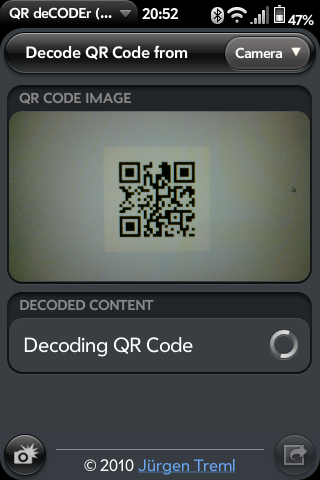 Once decoding has finished, the content of the QR code is displayed on your phone. QR Codes can contain various things from simple, plain text to phone numbers, internet addresses or a predefined SMS / text message and number to send it to, in order, to e.g. request further information on a product or subscribe to a news service, and so forth. QR deCODEr automatically detects a messages content. Phone number, URLs and email addresses are turned into hyperlinks, so you can simply tap them to open the phone application your browser or email on your phone. If the QR Code contains a predefined text message, click the message icon to open your phone’s messaging application prefilled with the text and number. With plain text content in QR codes you can similarly click the text icon to open a new email message prefilled with this text so you can copy and paste it, email it to yourself or someone else, etc.
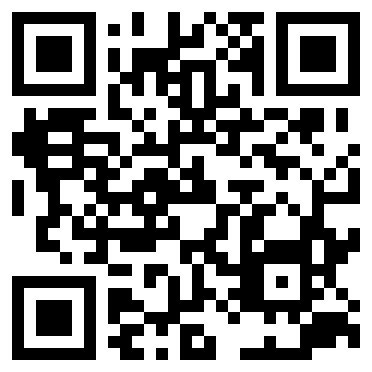
Got all that? Time to try for yourself then! Here’s a sample code:
Hi,
thanks fpr this great app. I had been waiting for it!
Just one sugestion:
Would it be possible to select the part containing the code, instead of uploading the entire picture?
I think this would fasten the upload, especialy in slow nets (edge or gprs).
Willie
This is a really cool app! What service do you use to decode the image?
The service powering this app is called zxing (http://code.google.com/p/zxing/).
I just downloaded the QR deCODEr app from the app store and read this page, snapped the picture and it did not take long at all to get the results from your sample QR coded image. When I see one of these images out and about I am definitely going to point and shoot! Thanks for the work on the app! Like all the other comments I’ve seen about it, it is too bad that the images can’t be decoded locally and that the Palm Pre camera isn’t the best. Overall, I still think this was a great app.
your product is not ready to be realest yet send email when it works right this tech. Few years away yet nice try thoght
Great app! Saw a report on CBC National and went to their website after downloading this QRC decoder. One shot of the QRC on the news website and a cew seconds a link appeared leading to the news article itself. All with my Palm Pre.
Hi,
great app but don’t work with webos 2.1.
Cheers
Björn
Hello Jurgen,
I’m trying to use your app on my Palm and I’ve read through all the help (but being a programmer who has played with QR codes for a while I knew most of it). I have yet to have the program decode a single QR code. It is just stuck on “Decoding QR Code” and never times out, errors, or completes with a decoded value. I’ve taken dozens of images following your instructions exactly. I’m thinking that since it doesn’t “fail” it is actually not working correctly? I am running it on an original Palm Pre with WebOS 1.4.5. This phone is not currently in service, so I’m running it in Airplane mode with Wi-Fi only. (I’m testing our company’s generated QR codes.)
OK, sorry, after I sent that previous message I realize that I hadn’t actually tested the web connection on the phone; it was broken at the firewall. The app must not have a timeout on the RPC for decoding the image? I left the phone for a couple of hours this morning to see if it ever returned and it never did. Once I realized the problem and got the firewall issue fixed I got one “server overloaded” error and then after restarting the app I got a successful decode. Disconnecting the Wi-Fi completely results in the same lack of completion (so it doesn’t detect that there is no network at all).
Thanks for the app!
Thank you for the feedback. Actually, the app should be able to detect the absence of a network connection. Seems there is some kind of a bug here. I’ll have a quick look into it, though I can’t promise you a quick fix. I’m in the process of rewriting the app to do the decoding on the device itself without any need to send the picture to some server to be decoded there. So I’m hoping to be able to release a completely revised, offline version of the app very soon.
If you would like me to test the beta, I would be happy to.
Is there a way I could download this app for my pre in Argentina? Thanks.
comments from myself.
hi,
ich habe mir auf mein neues pre3 meine “erste” app geladen und leider funktioniert qr decoder nicht. wie kann ich die wieder deinstallieren?
Hi Jürgen, habe mir qrdecoder geladen, startet auch auf dem TouchPad, macht dann aber schlicht nichts. Hab ich was uebersehen? LG Heiko
i
I’m gettin the “This application is not available for your carrier” message (AT&T). Is there a way to get the .ipk for this app?
Thanks!
calidad