
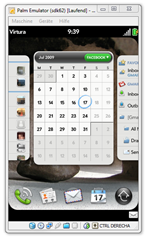
 Trying to install the Palm Pre / Mojo / WebOS SDK on my computer running Windows 7 RC. As reported here, I experienced the problem of the installer failing silently towards the end without an error message, performing a rollback. I have no idea how long it takes Palm or even if they are planning on fixing this in the near future, but a look into Windows event log shows that the silent failure of the installer is caused by a Windows Update package for the User Mode Driver Framework which the SDK installer tries to install but which apparently fails to install on Windows 7.
So my solution to the problem is simply not to make the SDK installer try to install this Windows Update Package. Since it’s only an update, it’s probably not crucial to running the SDK. So here’s a 15 min. procedure how to edit the Mojo SDK installer program based on this former blog post of mine, so that it skips the Windows Update package during install.
First of all two preliminary steps to install the tools we need:
- Download and install the Microsoft Windows SDK which contains a tool called Orca which we need for the procedure.
(You don’t have to install the whole SDK! You only need to select Developer Tools – Windows Development Tools during install) - After installing this, go to C:\Program Files\Microsoft SDKs\Windows\v7.0\Bin and run Orca.MSI in this folder, which install the actual Orca tool.
Update: Several people have mentioned this link, where you can download Orca directly without having to download and install the full Microsoft Windows SDK. You can get Orca from there and thus skip step 1.
Now the procedure to actually alter the Palm Mojo SDK installer:
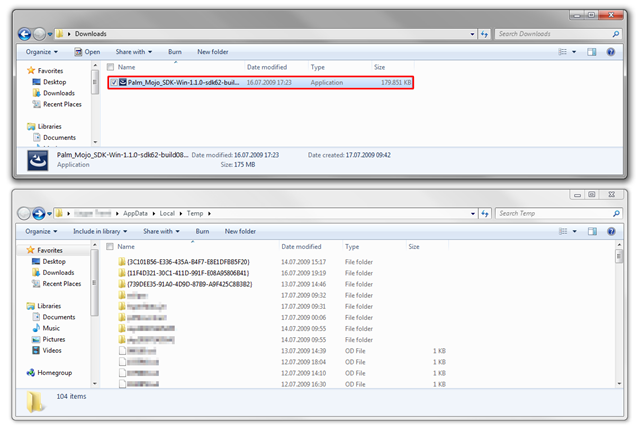
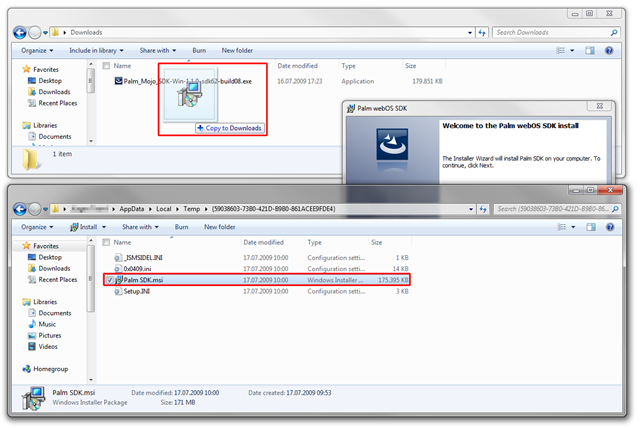
- Open the folder to which you downloaded the Mojo SDK installer (Palm_Mojo_SDK-Win-1.1.0-sdk62-build08.exe)
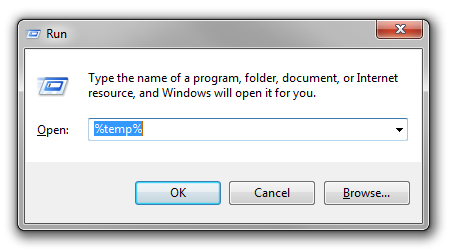
- Hit “Windows + R” on your keyboard (or click Start and Run) to bring up the Windows Run dialog and enter %TEMP%, hit enter.
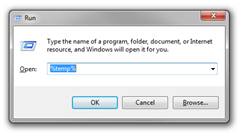
- Now arrange the two folders next to each other so you can see the both at the same time, then run Palm_Mojo_SDK-Win-1.1.0-sdk62-build08.exe.
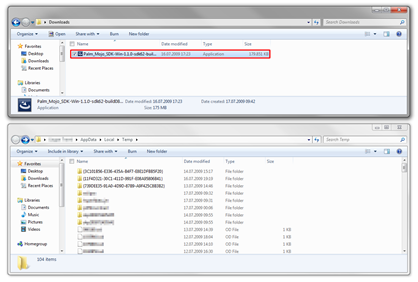
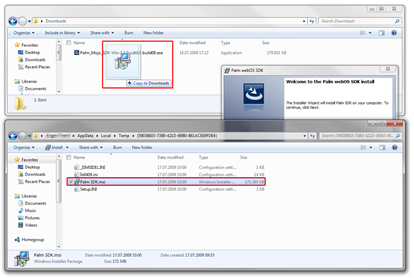
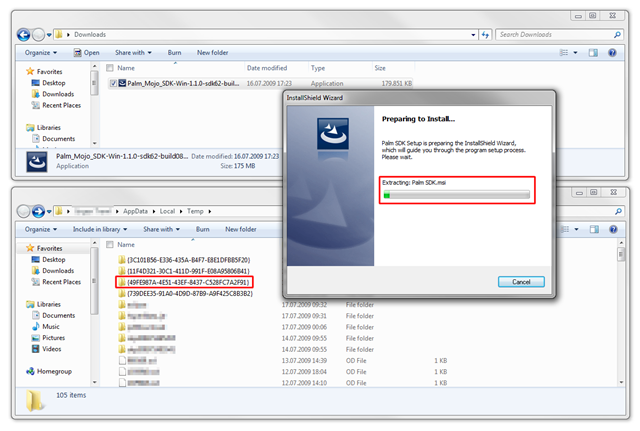
In your Temp folder you see all kind of weird files and folders, the important thing is, that once you run the installer above, a new folder with a random name starting and ending with brackets and consisting of lots of numbers appears.
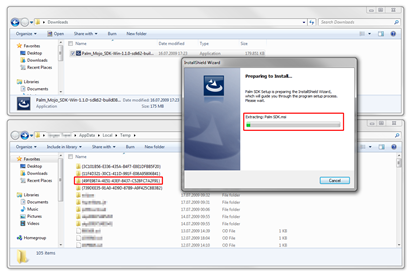
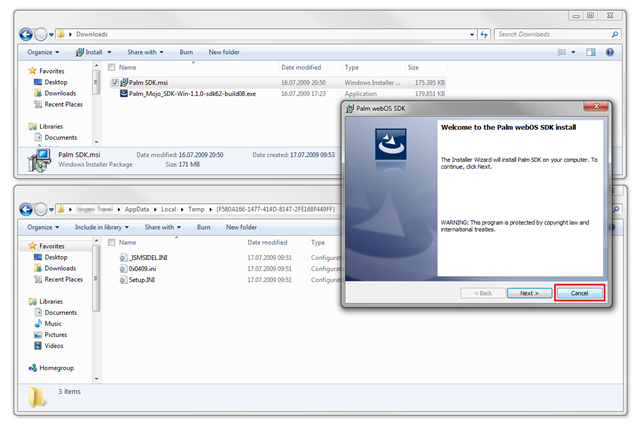
There may already have been similar folders in your Temp folder before you ran the installer, so try to locate the one that was created the moment you ran the installer. - Initially this folder contains nothing but three *.ini files, yet once the first step of the installer is completed a new file is created there, named Palm SDK.msi. Copy this file to the folder where Palm_Mojo_SDK-Win-1.1.0-sdk62-build08.exe is located.
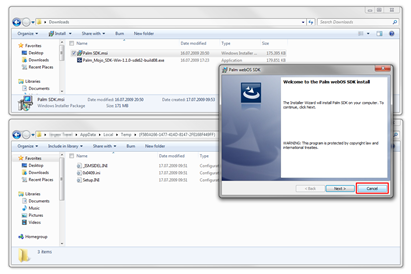
Once the copy process is complete, cancel the installer.
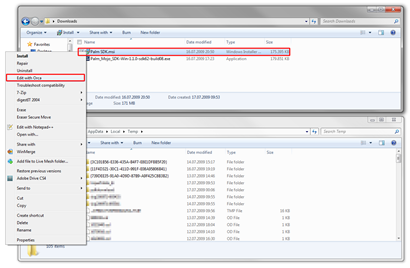
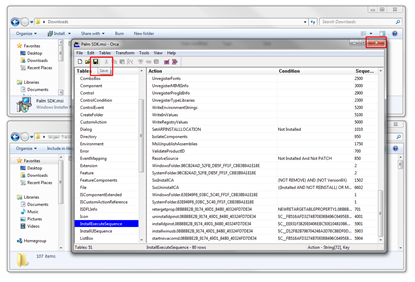
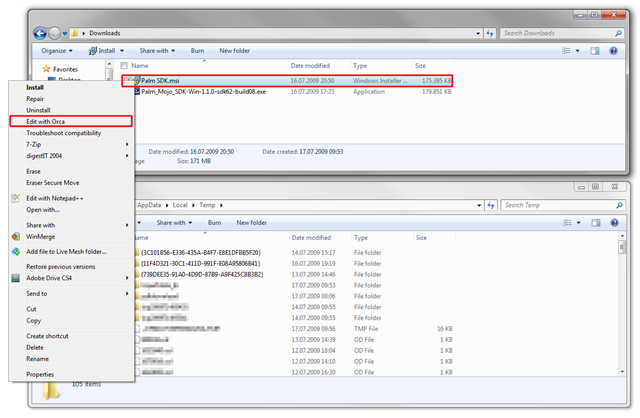
- Now right-click the copied file and select Edit with Orca.
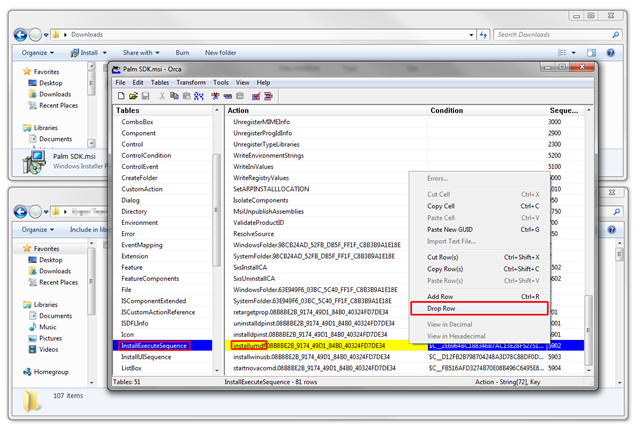
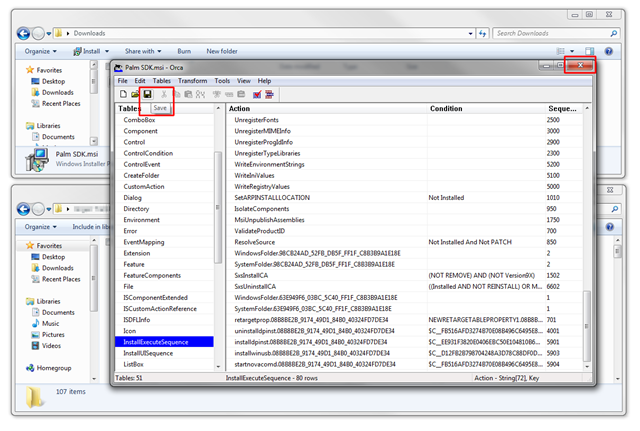
- In Orca, select InstallExecuteSequence in the left pane, the scroll to the very bottom in the right pane and select installumdf.08B8BE2B_9174_49D1_84B0_40324FD7DE34. Right-click and select Drop Row.
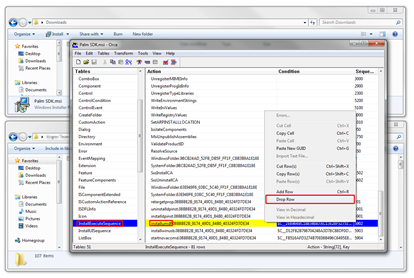
This removes the command to execute the Windows Update package which causes the installer to fail. - Now we’re almost done. Hit Save and exit Orca.
- Run Palm SDK.msi and just follow the wizard. The SDK should install fine now without any problems or failures.
A tiny tip at last:
Once the SDK is installed, if you want to run the Palm Pre emulator as suggested by Palm, right-click the application link and select Run as Administrator or if it still doesn’t work Troubleshoot compatibility and then select Windows XP SP2 mode. When I first just clicked the emulator link, nothing happend, no program appeared, … I don’t quite remember which one did the trick, running it as Administrator or in compatibility mode, but one of those finally made it work.
Some useful links regarding the SDK:
- How to operate / control the emulator, keyboard shortcuts, etc.
- Instructions how to install the Eclipse plug-ins for development
Important: The Eclipse plug-in update link given on the site doesn’t work. It’s and https link. Use this link (the same link with http) and it should work.
Have fun with the SDK!
Great! This worked for me! But i have the new VirtualBox 3 installed which isnt supported by the SDK
You can try it with VirtualBox 3.x. It seems to work, even though it’s not yet “officially supported”…
Your instructions worked great on Windows 7 x64 RC! Thanks!
i did this but when i click save i get an error message telling me the file cannot be saved. then the file just goes blank in the orca editor and it doesnt work. i need some help
make sure you’re editing the COPY of Palm SDK.msi with Orca, not the original file in your temp directory.
i got it. what i ended up doing what cutting that installumdf line in orca instead of deleting it. it works like a charm now thanks!
Thanks a lot for this. Worked like a charm on 7RC.
Thanks for posting detailed instructions, this fixed the issue
Works on Win 7RC 32bit VM. (Need to run the emulator as Administrator.)
Thanks, shame PALM couldn’t do this.
K
Thank you! I was scratching my head trying to figure out how to get this to cooperate on Win 7. Works great now.
You can also skip the SDK download, by downloading Orca MSI editor directly from here:
http://www.technipages.com/download-orca-msi-editor.html
I’m gonna try it and confirm..
Confirmed!
It’s a 1.82MB download that works like a charm!
Grab it here (same link as above):
http://www.technipages.com/download-orca-msi-editor.html
Thanks for the link. I just included it in the article above.
I didn’t want to risk any license agreements, etc. which is, why I didn’t include a download of either Orca or the modified Palm SDK.msi with the blog post above.
Thank you for the instructions, can’t wait to try this out at home! I would like to encourage you to remove the direct download link, though, on general security principle. You have far more assurance that your computer won’t get owned by trojans or viruses when you download the software straight from Microsoft instead of a random third-party site.
That’s 100% true and the reason why I left the original instructions as they were and instead just added the direct link as additional information.
I think the kind of people visiting this site, i.e. developers, etc., can decide for themselves which way they prefer and which are the risks involved.
I guess you’ve got a valid point Brian.
On the contrary, I agree with Jürgen that it’s a decision best left with the blog visitors.
Btw, I didn’t find any Trojan or Malware on it.
PS: I too probably feel that it would violate some point in the T&Cs to directly redistribute any part of the MS download without permission. But since the download isn’t hosted here, nor is it directly linked to from here, it shouldn’t be a problem
Thanks. This worked perfectly on Windows 7 Ultimate RTM.
BTW: I did not experience any issues running the emulator from the shortcut supplied by Palm. I am using VirtualBox 3.04
ok so i have orca but i cannot find my palm mojo file thing i’m not good with computers so maybe you can help?
and why the hell doesnt palm just update the software to fix this issue?
See the other comment below for the answer.
I am not able to edit the Palm SDK file with orca, I keep on getting the following error message: Failed to open MSI Database: ‘filelocation\Palm SDK.msi’ I have made sure the Palm-Mojo-SDK-Win-1.1.0.12 is in the same directory, I have made a copy of the file from the temp directory, I have even tried reinstalling orca(which launches fine by itself) but I cannot edit this .msi file for some reason. Any assistance would be much appreciated. Thank you.
Sorry, I should have posted a quick update on that matter some time ago: The latest version of Palm’s Mojo SDK works perfectly on Windows 7 (x86 and x64) without any tweaking, right out of the box.
Just download the latest version on Palm’s website, install and run.
Great information. Lucky me I discovered your site by chance (stumbleupon).
I’ve book marked it for later!