
 Flight Simulator X Google Earth Tracker
FSXGET
Summary | Comments & Feedback | Links & Download
History | Gallery
Show Flight Simulator X aircrafts and ground objects in Google Earth! Live!
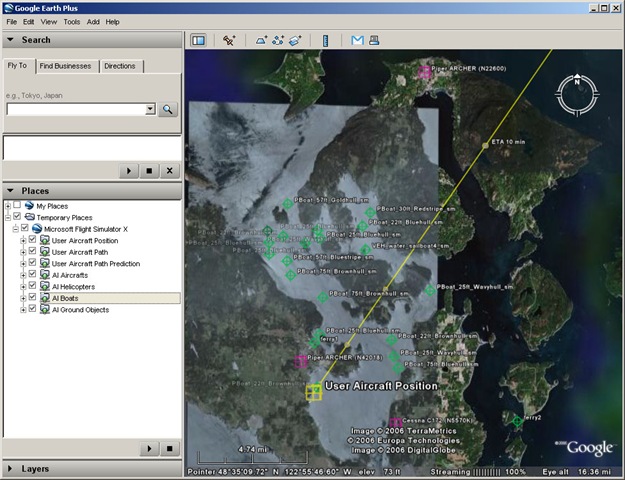 FSXGET is a tiny tool that allows Google Earth to display live simulation data from Flight Simulator X, e.g. your aircraft’s position, path flown, course prediction or any AI aircrafts, boats or ground vehicles. Together with the aircrafts’ positions, Google Earth will also display further information for each object such as ATC data, altitude, aircraft model, call signs, …
The program can run on the same computer as Flight Simulator X and Google Earth or on any other computer and connect to FSX and Google Earth via network. A tool called SimConnect Config Tool will help setting up networked mode.
FSXGET and the SimConnect Config Tool are both open source and being hosted on CodePlex.
You’re welcome to post any comments, suggestions, bugs or errors on this page here or you can use the discussion page on CodePlex for that.
In any way, I’d really like to here your feedback on the program! Really!
FSXGET is a tiny tool I’ve started developing when Flight Simulator X came out. It’s intention was to show you aircraft’s position in Google Earth in real-time. Nevertheless, during development many many more ideas kept coming to my mind and I started implementing quite a few of them. Thus, at the moment, the tool doesn’t only allow you to show your own plane’s position in Google Earth but also any AI vehicles such as aircrafts, helicopters, boats and ground vehicles. Furthermore you can record and display the path you flew as well as course predictions and ETA points for your own or any AI aircraft / vehicle. Flight information like ATC data, altitude, aircraft model and call sign can be displayed, too.
When I realized that I couldn’t go on spending the necessary time on the programming of this tool, I finally published the application as open source on CodePlex. Thus anyone can download, read and modify the source code to his likings.
Besides the source code, all formerly released versions as well as current and future versions are / will be available on the CodePlex project page for download. Additionally, CodePlex provides a discussion page and a bug tracking and feature proposal system.
Although I can’t spend as much time as I’d like to spend on FSXGET, I still have quite a few features in the pipeline (some of them thanks to great user feedback) which I’d like to add to the tool and I will continue to work on the program, probably at quite a low pace. After having recently published a Windows Vista compatible version of the tool and adding remote connection features to allow the tool to be run a computer different from the one running Flight Simulator, I’m currently trying to rebuild the tool from scratch to improve the code structure, maintainability and the user interface. This will probably take some time but is definitely necessary before continuing to add new features.
In any way, I’d be happy if you kept trying and testing the tool and especially if you kept on giving me feedbacks on any problems, bugs or missing features. Feel free to post comments on this site or use the CodePlex discussion site to do so. You can also email me at juergen@fsxget.com.


Hi
great looking tool! Does this work on Win2K? I run FSX on my Vista box, and want to run a moving map tool like this on my other machine, running Win2K… Is that possible?
Many thanks for your help
Andy
I’ve never tried it so far, so I can’t say no for sure but according to Microsoft’s documentation on the methods and libraries I’m using in FSXGET, it should require Windows XP SP2 or higher.
I want you to make something that can give us opportunity to fly in real time environment.We should be able to use the runway of the google earth to fly our aircraft .Could you kindly murge FSX and google earth.Tie up with microsoft and google earth.This is my view and the software will be sold like hot cake.You will be billionare.
Thanks
Mridul(India)
Hello Jürgen, I have on my Computer Vista 32 bits SP1, FSX-Sp1 and google Earth. All is on the same Computer.I have FSXGET 0 [1],1 beta 3 installed.It is connect indicated, but in Google Earth is everything with zero. No data of the FSX.
Es flashes, but no movement in googles Earth.Sim Connect tools I already tried.
I white however as I it to adjust am not. I would be pleased if you me to help can. Many greetings from Mülheim at the Ruhr/Germany
Wolfgang
please make it for xplane? TOM
Hello.
FSXget works fine with Windows XP (PC N°1), in the same pc or in an other pc connected (PC N°2).
But with a pc with Vista (PC N°3) i obtain the message : “FSX Exception !” when FSXget runs in the same pc. An other pc connected (N°2) does not receive anything from FSX.
When FSX is running on XP (N°1), FSXget runs fine in Vista (N°3) connected …
Have you any idea about that ?
Sorry for my bad english, i am french !
Bye.
OOPS !!! I just have forgot to install SP1.
Sorry
Now all is fine !
I use this on our server.
Excellent tool though I am still playing with it slightly to be able to show icons in google maps.
Server uses a fully updated XP and FSX with sp2 and FSGET works fine.
For all you that say it doesn’t work with vista, I use this now and then on my Vista 64 box and it works just as well as it does on our XP server.
Just like to say thank you for your hard work Juergen and if I can be of any help in return let me know.
http://www.vistafeel.com
Hi all!
As a fresh http://www.juergentreml.de user i only want to say hi to everyone else who uses this board
great idea…
Im really interested on this tool
perhaps we can add some fetures
Hello.
I’m new there
Nice forum!
hi all im trying to find out how i can put google earth flight tracker on to my website so its live
Hi!
As far as I can remember, some user of FSXGET has done this before. Have a look at the FSXGET discussion site on CodePlex, specifically the topic at http://fsxget.codeplex.com/Thread/View.aspx?ThreadId=33231. User “Roo” has adapted FSXGET to be used together with Google Maps in a website and he’s also posted links to see how this works on his website.
So I guess, the easiest way to figure out how to achieve your goal would be to get in contact with user “Roo” and ask him for the details.
Salve qualcuno mi può aiutare, Ho fsx, google earth, GET, cosa mi serve ancora? come funziona. Mi serve un tutorial.
I really (REALLY) enjoy using FSGet with FS/x.
But, I’m not a programmer; and can’t figure out how to get FSGet to ‘follow me’ or ‘keep my plane centred’ on Google Earth.
Has anyone any ideas ?
I recently downloaded and installed fsxget on a secondary computer, with fsx installed on my primary computer. Fsxget worked fine for several flight simulator sessions, until I did a Windows Update on the computer that has fsxget installed. Since that update, fsxget fails to load. The version of fsxget is 0.1 Beta 3. I don’t recall exactly what upgrades were installed when I did the windows update. Can you give me some pointers in troubleshooting my problem? Here is the Error signature from the program load failure:
EventType : clr20r3 P1 : fsxget.exe P2 : 0.1.2966.18355
P3 : 47b405d7 P4 : system.xml P5 : 2.0.0.0 P6 : 492b8670
P7 : 6c1 P8 : 27 P9 : system.xml.xmlexception
I’ve tried sending the error report to Microsoft, but it is never sent.
Both computers are using Windows xp, Professional Edition. I’m pretty sure that sp2 is installed on both. Any help you can give me will be greatly appreciated. I immensely enjoyed using fsxget before my problems started and am anxious to get it going again.
Thanks
hi just install it and i lauch flight sim but how to see it with my flight sim runing ? can i have both ? i also try to display the FSX Google Earth Tracker to my second screen without sucess
Thanks
Don’t forget to configure SimConnect (use SimConnect Config Tool).
ok and what i need to do once sim connect is installed ?
thanks
In the file Simmconnect.xml (in vista C:\Users\your-user-name\AppData\Roaming\Microsoft\FSX or XP C:\Documents and settings\your-user-name\Application Data\Microsoft\FSX) you must have :
SimConnect Server Configuration
SimConnect.xml
False
False
IPv4
Global
64
0.0.0.0
9017
It’s simple to use SimConnect Config Tool, just open it and clic on Add and Ok and Ok again.
Oops all lines beginning by ”
*SimBase.Document Type=”SimConnect” version=”1,0″>
*Descr>SimConnect Server Configuration*/Descr>
*Filename>SimConnect.xml*/Filename>
*Disabled>False*/Disabled>
*SimConnect.Comm>
*Disabled>False*/Disabled>
*Protocol>IPv4*/Protocol>
*Scope>Global*/Scope>
*MaxClients>64*/MaxClients>
*Address>0.0.0.0*/Address>
*Port>9017*/Port>
*/SimConnect.Comm>
*/SimBase.Document>
Just change “*” by “<"
I have tested Fsxget with Windows 7 RC :
FSX and Fsxget in the same computer W7(64 bits) : OK
FSX with XP and Fsxget with W7 : OK
FSX with F7 and Fsxget with XP : OK
All is working fine
hi ok i get bith installed in my pc and i set the ip 127.0.0.1 which is my loop back when i start fsx i get a popup for the exe to load and then i choose my aircrafy etc… what i need to do to access the google tracker ?
Thanks
hi..i just downloaded fsxget..how do i run it? i clicke don it then started fsx..i dont know what else to do? any help is appreciated..rgds ken
Great site good tool to work with google Earth whats new ?? Biggee
Leider läuft FSXGet nach dem letzten Win-Update nicht mehr auf xp (32 bit). Das Programm lässt sich nicht mehr starten. Kommt nur ne Fehlermeldung. Lief vorher ohne Probleme. Schade.
Hi Everyone…
I want to use this software with Windows 7 (actually updated every time) and the FSX Professional, but
1. – it doesn’t connect
2. – All screens are FSX-black (the FSX Screens Panels and so one runs, but not other windows applications
Everybody can help ? – Thanks in forward
Patric from Germany-Bavaria…
Hi! I would like to be able to open Free Flight mode in FSX with a specific aircraft and weather conditions using Python. Does anyone know how to do that?
Thanks!
Melissa
Guy .. Ausgezeichnete .. Wunderbar .. Ich werde Ihre Seite bookmarken und nehmen Sie die Feeds additionallyI zufrieden bin heraus zu suchen so viele nützliche Informationen hier in der Post , müssen wir arbeiten mehr Techniken in dieser Hinsicht , wir danken Ihnen für den Austausch . . . . . .
I’m running Vista Home Premium 32bit with latest SP2 and updates. When I launch FSX from FSXGET after 5 seconds or so, I get the message ‘FSX Exception!’ in a bubble.
I’m running this on a netbook whose graphics card is incomaptible with FSX SP2 so I am stuck with FSX SP1.
The main question is: Should FSXGET work with FSX SP1 and if so, could someone please give an indication as to why I might be getting the ‘FSX Exception!’ error and how to solve.
Thanks in advance.
Hi,
I have problems to install fsget, the installation seems to be ok, but when I start fsget I get the message : fsget stops working.
Please Help
OS= Windows7 64bit aktual updates are on
Regards Gerhard
Hi,
I deinstalled beta3 and installed beta2, this one starts and I be able to the icon.
I will finish the tests soon and let you know.
Regards Gerhard
Hi Juergen,
I’ve been trying to find a contact address for you to discuss your program GET. I’ve been workng on a maritime equivilant of VATSIM for about a year now and just got the website up and going( http://www.fsnavnet.com ) in January of this year. I’m not a programmer in the lest bit and I was interested in possibly using your program to create a “ship tracker” feature for the website. I played with it for about 4 days and I thing I finally got it to work, I just need confirmation from someone with a different machine not part of my network to see if they see the traffic. If so I’d like to talk to you about resaearching the source files you made available in order to possibly modifiy certain elements so they are maritime based. Please pm me or let me know if you get this comment as I will check the email notifications for this page to let me know you’ve answered.
Thanks for your time!!!
AJ
Всегда в наличие щелевые лампы, авторефкератометры, диоптриметры, станок для обточки линз и другое офтальмологическое оборудование
http://oftalmig.com.ua
[url=http://oftalmig.com.ua]Авторефкератометр[/url], [url=http://oftalmig.com.ua]Авторефрактометр[/url], [url=http://oftalmig.com.ua]Авторефрактометр дешево[/url], [url=http://oftalmig.com.ua]Авторефрактометр продам[/url], Авторефрактометр продам дешево, Щелевая лампа, [url=http://oftalmig.com.ua]Щелевая лампа карл цейс[/url], Щелевая лампа carl zeiss, Лампа щелевая, [url=http://oftalmig.com.ua]Диоптриметр[/url], [url=http://oftalmig.com.ua]Диоптриметр автоматический[/url], [url=http://oftalmig.com.ua]Станок для обработки линз[/url], Станок для линз weco, Станок для обработки линз weco, [url=http://oftalmig.com.ua]Станок для обточки очковых линз[/url], [url=http://oftalmig.com.ua]Набор пробных линз[/url], Проектор знаков, [url=http://oftalmig.com.ua]щелевая лампа щл-2б[/url], щелевая лампа Zeiss, [url=http://oftalmig.com.ua]станок для обработки линз[/url]
Obviously, a used computer will be inexpensive, but it will come with a short period of time warranty or even no
warranty at all. The standard peripherals, like audio, video, USB, 1394, Wi Fi, Bluetooth, are integrated in
the motherboard. In case, you see that an error page appears before the booting of
your operating system, you have to select boot to its.
Great tool – could it show a flight plan?
Thanks
Dave
How do you run FSXGET latest version. I have it installed and it won’t work. Thanks, Bob.
Hi,
super Tool!!
Ist zwar (anscheinend) schon 8 Jahre alt aber funktioniert immer noch problemlos (gerade am laufen mit Prepar3D v3.1 und dem neuesten Google Earth)!
Das wollte ich nur mal loswerden
hi.
nice tool. how is it possible to display the taxiway signs, and the illustration of ILS glidepath like in your pictures?
how can i set google earth to track me (moving map)?
thank you
Thanks for this great app.
would it be possible to get this for P3D v3 as well. This would indeed be stunning and very helpful.
Thanks and regards
It is working in P3D V3 without any problems.
Hi Jürgen,
wir sind gerade über dein tolles Programm gestolpert – werkelst Du daran noch? Gibt es irgendeine Möglichkeit, dass GE dem Flieger automatisch folgt?
Hello, how i put this software in my second computer, my first computer is running p3d, i would like to see in my second computer the google earth map